/etc/iftab. I love you udev! It's exactly what you want and expect - a table of ethernet addresses to interface names. Done. Aparently there was an older tool called ifrename that used to do this before udev. But yay! Problem solved.
Wednesday, August 30, 2006
/etc/iftab
As a follow up to my previous post about ifconfig... I have just discovered

glChess in the news
Gnome games is looking to drop one game and add another for the Gnome 2.18 release. An obvious inclusion is a chess game and someone has suggested adding glChess!
I like this because:
I am a little worried about:
I like this because:
- glChess is simple - I'm trying to keep clutter to a minimum (many existing programs have a lot of internal AI information / options). glChess would(/should) be good for people who just want to play chess. The networking (when I finish it) should be simple too
- I like Gnome!
I am a little worried about:
- performance - The use of 3D means many Gnome users would have rubbish performance. This could be solved by making glChess support both 3D and 2D (the internal design is keeping the scene rendering seperate from the rest of the code, it shouldn't be too hard to make a cairo interface).
Tuesday, August 29, 2006
How to render using Mesa
It is remarkable hard to get your OpenGL software to avoid using hardware acceleration. I required this to test some glChess bugs.
Under a DRI system you disable DRI by quoting out the
Under an annoying non-standard system (i.e. nVidia) I believe you can link your C program using something like
Under a DRI system you disable DRI by quoting out the
Load "dri" line in the Modules section in /etc/X11/xorg.conf. After restarting X everything 3D should be slow.Under an annoying non-standard system (i.e. nVidia) I believe you can link your C program using something like
-lGLMesa. However you are royally screwed if you use something like the Python bindings. Then you would have to do some recompiling/magic relinking to make it all work.
glChess 0.9.6
New release!
This version fixes a number of issues with software rendering. I found an interesting bug in Mesa which is now avoided (bug is fixed in Mesa CVS).
Also has a bunch of cosmetic fixes (about dialog, starts with empty board, changed perspective slightly, added icon) and an Italian translation. This release has some disabled networking code to be hopefully re-enabled in 0.9.7.
This version fixes a number of issues with software rendering. I found an interesting bug in Mesa which is now avoided (bug is fixed in Mesa CVS).
Also has a bunch of cosmetic fixes (about dialog, starts with empty board, changed perspective slightly, added icon) and an Italian translation. This release has some disabled networking code to be hopefully re-enabled in 0.9.7.
Friday, August 25, 2006
Arrgh! I hate developers!
Constantly having to change my networking configuration is driving me insane. So I
I can't believe how complex people manage to make their code - this is a program with only ~2000 lines of C code but it's just unreadable. The indentation is all over the place and there's wacky documentation preprocessor directives spilt all through it. There's probably some elaborate IDE that makes it readable but come on - stop making write-only code people!
apt-get source ifupdown'd to start some hacking.I can't believe how complex people manage to make their code - this is a program with only ~2000 lines of C code but it's just unreadable. The indentation is all over the place and there's wacky documentation preprocessor directives spilt all through it. There's probably some elaborate IDE that makes it readable but come on - stop making write-only code people!
Monday, August 07, 2006
Reasons not to use low level languages
I followed a link from Planet Gnome to a patch for Evolution that fixes a lot of memory leaks. Well sure, I thought, it will be fixing some obscure bugs right? Well it turns out a lot of the patch changes are replacing lines like this:
I can't blame the developers too much - in C I always found it a mission to keep track of memory (this sort of thing takes time from adding content) but it just goes to show. If you can use a garbage collector, do - anything else should be treated as an optimisation. And any optimisation you do should be able to justify (ideally with numbers).
/* TODO: Free stuff */. So the product is knowingly produced with memory leaks. Ouch.I can't blame the developers too much - in C I always found it a mission to keep track of memory (this sort of thing takes time from adding content) but it just goes to show. If you can use a garbage collector, do - anything else should be treated as an optimisation. And any optimisation you do should be able to justify (ideally with numbers).
Thursday, August 03, 2006
A nice webserver

Saw a link to Cherokee today, looks like a nice, lightweight and easy-to-configure web server. I am not a fan of apache (bloated and obscure) so I'll be trying this one next time I need a web server.
Tuesday, August 01, 2006
Google calendar + Evolution
For those familiar with Gnome there is a calendar widget on the upper taskbar (by default). This is probably one of the most useful features of the Desktop: it shows the full date and clicking on it brings quickly brings down a small calendar. I use this all the time and are constantly tripped up when using Windows (their one only displays partial date, tooltips take ages to come up, double clicking on it brings up config window with calendar that takes ages).
So today I thought since this mini-calendar was linked to the Evolution Data Server (implemented I don't know how many Gnome versions ago), perhaps I could put my Google Calendar in there. So double click on a day and Evolution (slowly) pops up. After getting lost in the heavy interface I go Menu->New->Calendar, copy the address Google Calendar provides in the settings and voila! My Gnome desktop now displays all my appointments (and birthdays) one click away from anywhere! 11 chainsaws out of 10!
So today I thought since this mini-calendar was linked to the Evolution Data Server (implemented I don't know how many Gnome versions ago), perhaps I could put my Google Calendar in there. So double click on a day and Evolution (slowly) pops up. After getting lost in the heavy interface I go Menu->New->Calendar, copy the address Google Calendar provides in the settings and voila! My Gnome desktop now displays all my appointments (and birthdays) one click away from anywhere! 11 chainsaws out of 10!
Monday, July 31, 2006
Playing with Avahi
Today I was playing around with Avahi for inclusion in glChess. The documentation is a little thin but luckily there are some helpful people in #avahi. So in glChess subversion _glchess._udp (still don't quite get the Zeroconf naming) services show up in the (new) join game dialog. I've got the transport layer working for the network so it should all come together some time soonish.
But I can't post without a bit of a gripe... It seems a lot of APIs have ultra generic function/method calls which means when you pass in an incorrect parameter you get some useless error message. Developers *please* explicitly check the passed variable signature is correct and generate a meaningful error message if it does not.
Oh and once the networking is done I need a serious refactoring session.
But I can't post without a bit of a gripe... It seems a lot of APIs have ultra generic function/method calls which means when you pass in an incorrect parameter you get some useless error message. Developers *please* explicitly check the passed variable signature is correct and generate a meaningful error message if it does not.
Oh and once the networking is done I need a serious refactoring session.
Friday, July 28, 2006
Broken base tools that need fixing
Here is a note to myself for base Linux tools that require fixing:
- ifconfig - interfaces are configured by kernel name not MAC address. You should be able to do either as Linux randomly assigns interface names (at least to ethernet devices). On my work PC I have three network interfaces. I think the issue is the USB one gets detected at different times on boot
- Fix 'ps' - As stated earlier it does not print entire process names even when it has loads of screen real-estate. I think the whole process could be rewritten and work much better.
- etc etc (post comments of more)
Thursday, July 27, 2006
The crapness of old software
Last weekend I was bitching to Robert about how 'ps' was crap - it only displays 15 characters of the process name no matter how wide the console is.
e.g.
Sure the Gnome Power Man is a great process but other examples don't work so well. ;) So together we checked out the source (
Holy crap it is an obscure mess. I have previously found a bug in mount and it was a mission to track it down - that code is appalling too. Why is this old "base" code so crap?
Eventually I found out how the columns were generated in 'ps' and found the column is hard-coded to be of length 15. You could change it to be bigger but the columns can be ordered in any way so if you wanted a complex output it would be too wide. It looked like the column was supposed to expand if it the last one but I couldn't get the damn thing to work. The data is copied so many times through global variables it is too much of a mission.
So I gave up still not sure where the actual printf is...
e.g.
bob@alchemy2:~$ ps -A
  PID TTY          TIME CMD
    1 ?        00:00:01 init
...
 4995 ?        00:00:00 gnome-power-man
Sure the Gnome Power Man is a great process but other examples don't work so well. ;) So together we checked out the source (
apt-get source procps) and had a crack at it.Holy crap it is an obscure mess. I have previously found a bug in mount and it was a mission to track it down - that code is appalling too. Why is this old "base" code so crap?
Eventually I found out how the columns were generated in 'ps' and found the column is hard-coded to be of length 15. You could change it to be bigger but the columns can be ordered in any way so if you wanted a complex output it would be too wide. It looked like the column was supposed to expand if it the last one but I couldn't get the damn thing to work. The data is copied so many times through global variables it is too much of a mission.
So I gave up still not sure where the actual printf is...
Tuesday, July 25, 2006
The Python Challenge
Mr Hunter introduced me to the Python Challenge. It's a cool puzzle that presents you with lots of computationally complex situations (which you can solve suprisingly quickly using Python). I think we got to about 15 before I thought I should catch a train home.
I enjoyed annoying him by doing it all from the command line (no smelly files/IDE for me :P)
I enjoyed annoying him by doing it all from the command line (no smelly files/IDE for me :P)
Friday, July 21, 2006
Ubuntu 6.06 versus 128MB RAM
Yeah when they say that Ubuntu 6.06 recommends 256MB+ of RAM to install they are not joking. I was trying to install it on a Dell Optiplex GX110 and it ran like a dog. The intaller died on the partitioning step (looks like the /dev entry didn't appear). So I deleted the partition table and rebooted. This time since there was no handy swap partition it ran like a very sick dog.
Insert a 128MB DIMM and it works like a charm. I never checked the RAM when I started - it would be a nice feature to write in large letters somewhere at the start of the installer "YOU HAVE THIS CPU, RAM, FREE SPACE" etc. Oh and when did it get so hard to match RAM to a PC? It took many attempts to find a working DIMM (eventually canabalised from an old Optiplex GX110). I'm sure back in the 386 days any RAM would do :)
Insert a 128MB DIMM and it works like a charm. I never checked the RAM when I started - it would be a nice feature to write in large letters somewhere at the start of the installer "YOU HAVE THIS CPU, RAM, FREE SPACE" etc. Oh and when did it get so hard to match RAM to a PC? It took many attempts to find a working DIMM (eventually canabalised from an old Optiplex GX110). I'm sure back in the 386 days any RAM would do :)
Sunday, June 25, 2006
Trawling on happypenguin.org
I seem to go trawling on the Linux Game Tome every few months to see what is going on in the Open Source game world. Normally I have a slim chance of getting most of these games working but I found Balazar Brothers which being written in Python made it quite easy. I had to install the files to make it run so some custom .deb packages and now it works quite well. It's basically a jumping puzzle game but it with more polish would be quite fun. In the future it would be nice to have a small set of simple but good quality games that average users can install on their Open Source desktop.
The english translation was a bit confusing so I've sent an updated version to the developers. I'm also not sure what to do with the .deb packages - Perhaps I should find some server space where I can make my own .deb repository...
I noticed when Balazar starts up it says:
So I went and found Psyco - a JIT compiler for Python. I remember reading about this (or a similar) project a while ago but I didn't realise it was ready and working. An apt-get install later I guess it's running in the background! I think glChess was slightly faster but I'll have to investigate more in the future.
Oh Balazar Brothers is basically a mini-game spin-off of an RPG called Balazar. Haven't got that to work yet though as it tries to write back to /usr. Naughty!
The english translation was a bit confusing so I've sent an updated version to the developers. I'm also not sure what to do with the .deb packages - Perhaps I should find some server space where I can make my own .deb repository...
I noticed when Balazar starts up it says:
* Balazar * (Psyco not found ; if you are using an x86 processor, installing psyco can speed up Balazar a little)So I went and found Psyco - a JIT compiler for Python. I remember reading about this (or a similar) project a while ago but I didn't realise it was ready and working. An apt-get install later I guess it's running in the background! I think glChess was slightly faster but I'll have to investigate more in the future.
Oh Balazar Brothers is basically a mini-game spin-off of an RPG called Balazar. Haven't got that to work yet though as it tries to write back to /usr. Naughty!
Wednesday, June 14, 2006
Dear Lazyweb (re: Python packaging)
How are Python applications supposed to be packaged?
I was building a distutils setup.py for glChess. The distutils doc describes itself as:
However glChess is an application and not a library so does not need to make any of its code publically available. Should I make a site-packages/glchess package with all the glChess code? Then what about name spaces - I guess "glchess" is safe but other application names could collide with library packages/modules. Should I use "eggs" (can't find a lot of documentation on these). Note I have not found a Python application that installs its code with distutils (links anyone?).
Also as a side note is there simple way of including translation files in distutils? For glChess I have a directory of gettext translation files po/en.po, po/en_NZ.po etc which get built to po/en.mo, po/en_NZ.mo etc. These should then be installed into /usr/share/locale as en/LC_MESSAGES/glchess.mo and en_NZ/LC_MESSAGES/glchess.mo. Note that the .mo files have been renamed however distutils.core.setup() does not allow file renaming through the data_files argument.
I was building a distutils setup.py for glChess. The distutils doc describes itself as:
... (use) Distutils to make Python modules and extensions easily available to a wider audience ...
However glChess is an application and not a library so does not need to make any of its code publically available. Should I make a site-packages/glchess package with all the glChess code? Then what about name spaces - I guess "glchess" is safe but other application names could collide with library packages/modules. Should I use "eggs" (can't find a lot of documentation on these). Note I have not found a Python application that installs its code with distutils (links anyone?).
Also as a side note is there simple way of including translation files in distutils? For glChess I have a directory of gettext translation files po/en.po, po/en_NZ.po etc which get built to po/en.mo, po/en_NZ.mo etc. These should then be installed into /usr/share/locale as en/LC_MESSAGES/glchess.mo and en_NZ/LC_MESSAGES/glchess.mo. Note that the .mo files have been renamed however distutils.core.setup() does not allow file renaming through the data_files argument.
Saturday, June 10, 2006
Pouet Chess
Found another GPL chess program, Pouet Chess. Seems quite nice, very clean and simple to use (downloaded a binary and it worked fine). It's fullscreen (SDL). I don't know what chess people do but there really does seem to be a huge gap in the Linux/open source chess market. Does everyone just use XBoard? It's very functional but fairly bland looking... I guess pros use windows/web/Java clients?
Saturday, June 03, 2006
Dapper and Network Manager
Got network manager working in Ubuntu LTS 6.06 (Dapper Drake)...
1. Install with Applications->Add/Remove... Internet->Network Manager (or apt-get install network-manager-gnome).
2. Disable your network interfaces with System->Administration->Networking and for each device Properties->Enable this connection (uncheck). Otherwise Network Manager will not have any interfaces to use.
3. Add the applet with System->Preferences->Sessions Startup Programs->Add and type in nm-applet.
4. Log out and log in again to have it all working!
For full instructions see the Ubuntu wiki.
As a side note this install crashed logging out of gnome. First I got a white screen with a working pointer, not response to alt-ctrl-backspace. Going to terminal with alt-ctrl-F1 caused stripes to appear and then the whole OS locked up. Grr
1. Install with Applications->Add/Remove... Internet->Network Manager (or apt-get install network-manager-gnome).
2. Disable your network interfaces with System->Administration->Networking and for each device Properties->Enable this connection (uncheck). Otherwise Network Manager will not have any interfaces to use.
3. Add the applet with System->Preferences->Sessions Startup Programs->Add and type in nm-applet.
4. Log out and log in again to have it all working!
For full instructions see the Ubuntu wiki.
As a side note this install crashed logging out of gnome. First I got a white screen with a working pointer, not response to alt-ctrl-backspace. Going to terminal with alt-ctrl-F1 caused stripes to appear and then the whole OS locked up. Grr
It's all dappery
Was playing around with the Ubuntu update manager and it now has a button to upgrade to 6.06 (Dapper Drake). So with just a few clicks and 800M later and I'm here. Quite a smooth upgrade, just need to install a few extra packages when you're done. Gnome is noticably smoother and some nice new features (like editing the menus and deskbar - very nice).
Only thing to get working is network manager again. Seem to have lost some audio codec support with gstreamer 0.10, though you can get better support using libxine I'll stick with gstreamer for now.
From the reviews/screenshots I've been seeing of Vista I think Microsoft is not making good progress. The rate of innovation seems a lot higher in Linux/Gnome and the fast release cycles is leaving MS in the dust. Vista seems to have mostly things that are matching the competition (composite window manager, applets, tabbed browsing) and added far too many user options (endless pop ups, dialogs etc). They really should have had the balls to remove a lot of fluff from their UIs as I think they peaked in usability in Windows 2000 (I'm always trying to find options in Windows nowadays).
I guess Apple will have some new innovation around the corner but for now they have the top polished GUI. Sneaky Apple...
Only thing to get working is network manager again. Seem to have lost some audio codec support with gstreamer 0.10, though you can get better support using libxine I'll stick with gstreamer for now.
From the reviews/screenshots I've been seeing of Vista I think Microsoft is not making good progress. The rate of innovation seems a lot higher in Linux/Gnome and the fast release cycles is leaving MS in the dust. Vista seems to have mostly things that are matching the competition (composite window manager, applets, tabbed browsing) and added far too many user options (endless pop ups, dialogs etc). They really should have had the balls to remove a lot of fluff from their UIs as I think they peaked in usability in Windows 2000 (I'm always trying to find options in Windows nowadays).
I guess Apple will have some new innovation around the corner but for now they have the top polished GUI. Sneaky Apple...
Monday, May 15, 2006
Released glChess 0.9.3
Release glChess version 0.9.3 (screenshot looks much the same as the previous one).
Didn't get the multi-threading into it but the history bar works well and I added piece animation. This had been requested many times but now with the new code was quite easy to implement. I refactored the code quite a lot from 0.9.2 so hopefully it is more to the liking of others :).
Didn't get the multi-threading into it but the history bar works well and I added piece animation. This had been requested many times but now with the new code was quite easy to implement. I refactored the code quite a lot from 0.9.2 so hopefully it is more to the liking of others :).
Sunday, May 14, 2006
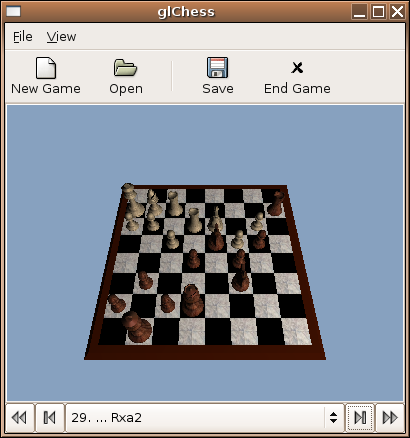
New, improved! Now with navigation bar!
Sneak preview...

Things to do next:
Things to do next:
- Tidy up the code a lot
- Thread the loading and saving
- Profile the code to optimise a bit
Subscribe to:
Posts (Atom)